
Scale-Up :
Fast, effortless course adoption
CogBooks is an adaptive-learning platform used by universities. I redesigned the course adoption process, turning a slow, team-dependent process into a self-service workflow inside instructors’ existing LMS.
Course adoption had become a growth bottleneck.
Instructors had to rely on multiple CogBooks teams to set up a course or make even minor changes.
- 23
- 10+
- 12+
Giving instructors control of the course adoption process.
I redesigned the experience as a guided, self-service flow within their university provided LMS.
- 1 Discover
- 2 Customize
- 3 Adopt
The Impact
3 Steps
Simplified process
23 steps (Before)
30 Min
Or less required to adopt a course
10+ days (Before)
2 Resources
Now to setup a course
12+ CogBooks resources (Before)
How I Got There
I looked beyond the interface to understand where the adoption process was actually breaking down across instructors, internal teams, workflows, and systems.
Research participants
24
Dependencies identified
41
Failure points identified
26
- Instructors + Stakeholders
- Process Mapping
- Flow Redesign
- UI Design
A 23-Step Setup Flow Was Blocking Adoption
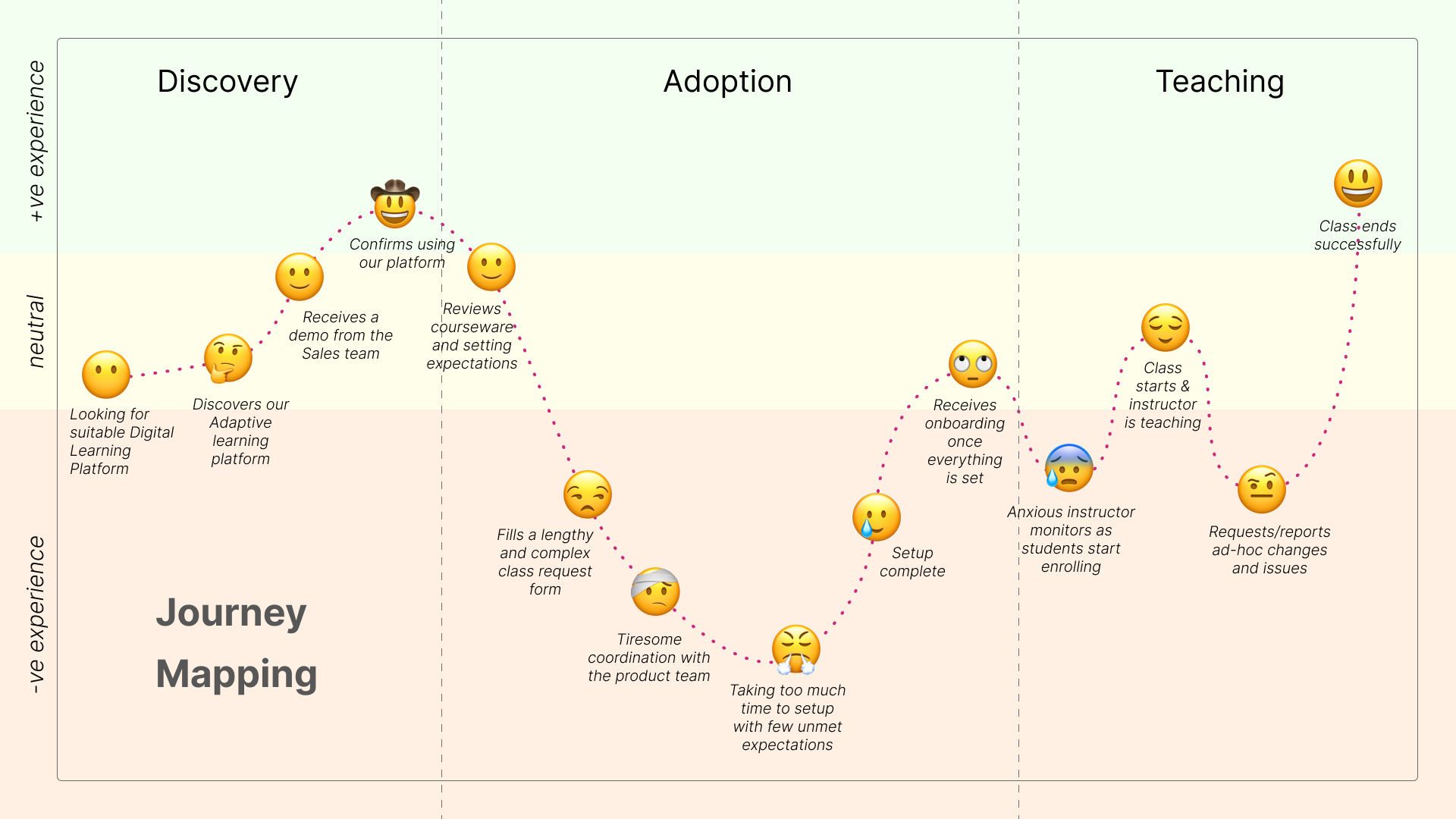
CogBooks’ Course adoption had become a growth bottleneck. Instructors faced a long, manual process that required heavy coordination across teams, making even small course changes slow and frustrating.
23 Steps
LONG AND COMPLEX PROCESS
10+ Days
REQUIRED TO ADOPT A COURSE
12 Resources
NEEDED TO SETUP A COURSE
“The process is very complex. Even minor changes, like adding or removing a topic, require multiple emails. At times, it is easier to ask students to ignore a topic than to have it removed by the CogBooks team.”
- Instructor, ASU
Research Across Instructors, Stakeholders, and Internal Teams
Over six weeks, We spoke with 24 participants across instructors, external stakeholders, and internal teams to understand where the adoption flow was breaking down and what both users and the business needed from a better process.
User research
24
Following user research, collaborative sessions were conducted to align teams, synthesize insights, and translate findings into actionable design and business strategies. These sessions resulted in the collective generation of more than 15 solution concepts and 6 were developed.
2+
workshops conducted
3+
alignment sessions
15+
4+ low efforts
3+ mid efforts
8+ high efforts
The Biggest Delays Came from Setup Dependencies and Repetitive Work
The biggest friction came from setup dependencies, repetitive tasks, and the need to rely on support for basic changes. Most of the effort was concentrated before instructors could even start using the product.
User Interviews insights
University instructors and internal stakeholders
Said course setup with the product team was tiresome.
Disliked contacting the product team for minor changes.
Of marketing staff struggled to explain the manual process.
Of product team members reported repetitive tasks.
Process mapping insights
Operational observations across CogBooks teams
Of support tickets related to course adoption.
Interdependent steps caused delays and confusion.
Failure points and bottlenecks identified.
Resources involved in a single process.
Pain Points
Mapping pain points for users and the stakeholders
Mapping the pain points revealed issues across functionality, process, and technical aspects of the flow. For this project, the focus was placed specifically on improving the adoption flow.
Six key pain points were identified, and addressing them would significantly reduce friction in the adoption flow.
Instructors work primarily in the LMS. Switching between LMS and external tools like CogBooks adds extra effort and reduces efficiency.
I Simplified the Flow into Discover, Customize, and Adopt
I restructured the experience into three clear stages: Discover, Customize, and Adopt. This created a simpler path that directly addressed the main pain points surfaced in research and process mapping.
Discover, Customize, and Adopt flow overview.
To define the "Discover, Customize, and Adopt" flow, I used scenario mapping to break the experience into clear steps and identify the key actions, decisions, and system behavior using a scenario mapping.
Detailing the new course adoption process.
Translating the New Flow into Early Interface Concepts
I translated the new workflow into rough sketches and low-fidelity wireframes to test how the simplified adoption experience would work across the LMS flow before moving into polished UI.
Low-fidelity wireframes for the new course adoption process.
CogBooks Course Catalog in LMS
Browsing a CogBooks course in the LMS.
Browsing a CogBooks course in the LMS.
Designing the Final Workflow Within the Product Ecosystem
I Designed the UI for the new workflow in alignment with the CogBooks design system.
CogBooks Course Catalog in LMS
CogBooks Course Catalog in LMS.
CogBooks Course Catalog in LMS.
Experience the interactive prototype
The Redesign Reduced Setup Time from 10+ Days to Under 30 Minutes
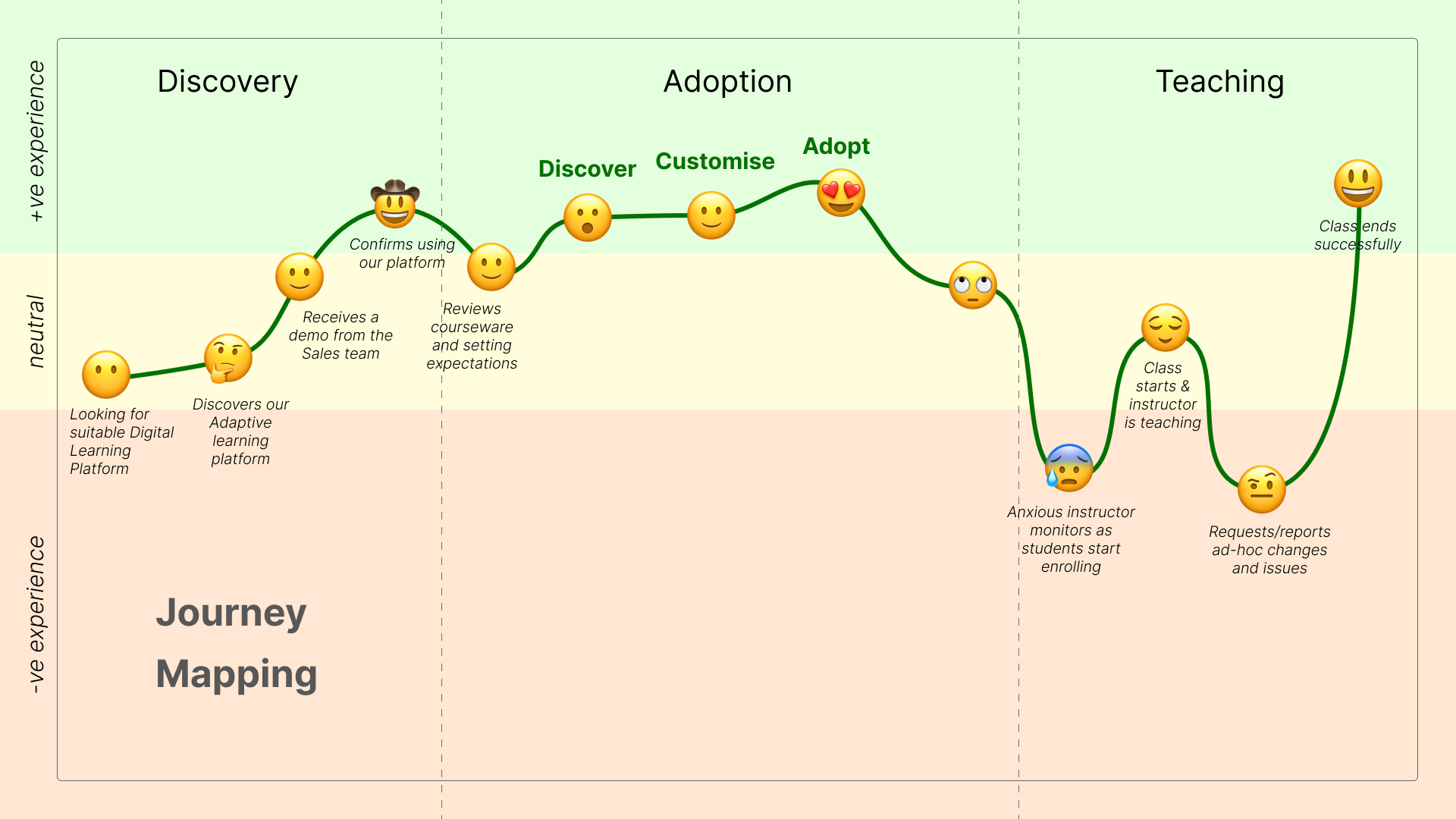
The redesign reduced course adoption from 23 steps to 3, cut setup time from more than 10 days to under 30 minutes, and lowered resource needs from 12 people to just 2.
87% reduction in steps (from 23 to 3)
99% reduction in setup time (over 10 days → under 30 minutes)
83% reduction in resource requirements (from 12 to 2 CogBooks staff)
Use the slider to compare the old and new flows.
“This was something we were looking for quite some time. Really glad to see this now in action. The new integration removes a lot of burden from us and our users. Appreciate the great work by the team.”
— Director, Learning Experience & Student Success, ASU
The New Flow Was Strong Enough for Competitors to Follow
One competitor recently launched an almost identical version of our adoption experience, nearly 10 months after CB introduced the new process.
What This Project Taught Me About Reducing Adoption Friction
This project reinforced a simple principle: adoption improves when users can act where they already work, avoid unnecessary dependencies, and move through a flow built around outcomes instead of internal process complexity.
Meet users where they already work
Embedding in the LMS reduced context switching and lowered adoption friction.
Expose dependencies, then remove them
Process and journey maps revealed 41 interdependencies and 26 failure points to address.
Measure outcomes, not outputs
Designing to a metric reduced setup time from over ten days to under thirty minutes.
Prototype early to align quickly
Interactive demos accelerated stakeholder decisions and clarified scope early.